- Home Page /
- Electronics /
- Computer Accessories /
- Networking Products /
- Print Servers /
- Dual-Mode USB Print Server for Sharing USB Pr...
0 ratings


Item #:
30908820
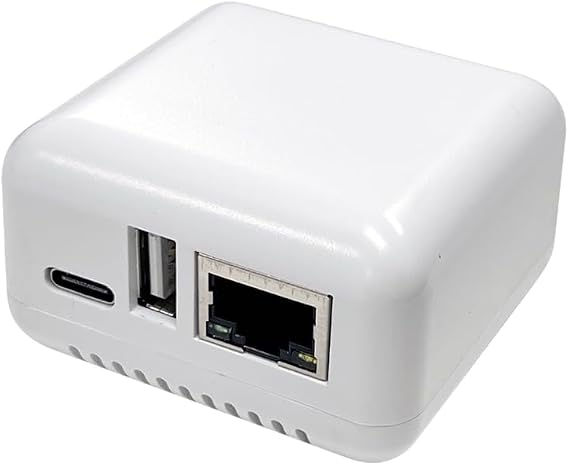
Dual-Mode USB Print Server for Sharing USB Printer Through LAN Local Network
73% of respondents would recommend this to a friend
Item #:
30908820
SAR 270
Price Details
Excluding Shipping & Custom charges ( Shipping and custom charges will be calculated on checkout )
*All items will import from US
0 ratings
Write a review
In stock
 Imported from USA store
QTY:
Order now and get it around Thursday, October 08
Secured transaction
Ubuy works hard to protect your security and privacy. Our advanced payment security system ensures confidentiality by encrypting your information during transmission using AES (Advanced Encryption Standards) and SSL (Secure Socket Layer) protocols. Your payment details are 100% secure as we do not share your payment details with third party sellers.
Our Top Logistics Partners


Premium printer to network adapter for all USB printer use. Any computer on the network can access and control the networked USB printer directly.

Buy Now Pay Later

Fast
Shipping

Free
Return*

Secure Packaging

100% Original Products

PCI DSS Compliance

ISO 27001 Certified




Note: Step Down Voltage Transformer required for using electronics products of US store (110-120). Recommended power converters Buy Now.


What Stands Out
Dual-Mode Functionality
Seamlessly switch between USB direct connection and LAN sharing, ensuring flexibility in how you connect your printer across various devices and networks.
Easy Setup
User-friendly installation with minimal configuration required, allowing you to quickly integrate the print server into your existing network without technical hassle.
Cross-Platform Compatibility
Supports multiple operating systems to ensure reliable printing from PCs, laptops, and mobile devices, making it ideal for diverse office or home environments.
Product Details
- Transform any USB printer into a wireless printer over the local network or Wi-Fi
- Share one printer over the network, saving money, space, and reducing cable clutter
- Simple setup requires installing the printer driver on each networked computer
- Allows placing the printer anywhere within the Wi-Fi range
- Easily change the IP address of the print server using a smartphone, tablet, or computer
- Compatible with Windows OS (Win10, Win8.1/8, Win7, XP) and Mac OS, and all types of printers
| Printer Type | Laser, Thermal |
| Other Special Features of the Product | Network-Ready |
| Printer Output Type | Monochrome |
| Item Weight | 4 ounces (113.4 grams) |
| Print media | Labels |
| Compatible Devices | PC, Smartphones, Tablets |
| Additional Printer Functions | Print Only |
| Control Method | Remote |
| Maximum Media Size | A3 |
| Maximum Print Resolution Black and White | 600 dpi |
| Duplex | simplex |
| Brand | AllAboutAdapters |
| Model Name | W-USB-PS12 |
| Model Number | W-USB-PS12 |
| Built-In Media | Ethernet Cable |
| Model Series | USB Print Server |
| Specific Uses For Product | Gaming |
| Unit Count | 1 Count |
| Manufacturer | AllAboutAdapters |
| Printer Connectivity Type | USB, Wi-Fi |
| Hardware Interface | USB |
| Total Usb Ports | 1 |
| Connectivity Technology | USB, Wi-Fi |
| Printing Technology | Laser, Thermal |
| Special Feature | Network-Ready |
| Printer Output | Monochrome |
| Included Components | Ethernet Cable |
Who Should Buy?

-
Home Office Users
Ideal for remote workers needing to share a single printer across multiple devices on a home network.
-
Small Businesses
Useful for small teams requiring multiple devices to access a single printer without constant physical connections.
-
Tech Enthusiasts
Great for users who enjoy experimenting with network devices and streamlining their home or office network setup.

-
Large Corporations
Not suitable for large businesses requiring extensive and reliable printing infrastructure; scalability may be limited.
Product Description
Dual-Mode USB Print Server for Sharing USB Printer Through LAN Local Network
About This Item
Introducing the Dual Wired and Wireless USB Print Server: Your Solution for Easy Printer Sharing Are you tired of having multiple printers for each computer in your home or office? Say goodbye to the hassle and expense with our premium Dual Wired and Wireless USB Print Server. This innovative device allows you to transform any USB printer into a wireless printer, making it accessible for all users through a wired or Wi-Fi network. Save Money and Simplify Your Setup With this USB print server, you can save money and eliminate the need for multiple printers. By connecting your USB printer to this device, all computers on your local network or Wi-Fi network can access and print to it.
This means less cable mess and more space in your workspace. Place Your Printer Anywhere Thanks to the Wi-Fi functionality of this print server, you can place your printer anywhere within the range of your Wi-Fi network. No more worries about the proximity of your printer to each computer. Whether you want to keep it in a central location or tuck it away in a separate room, the choice is yours. Easy Setup and Configuration Setting up this print server is a breeze.
Simply connect the USB server box to your wired or wireless router and provide power. Then, follow the easy steps to add a network printer on each computer. By installing the printer driver on each networked computer, you can gain access to the printer connected via the print server. Compatibility with All Printers and Operating Systems Our USB print server is fully compatible with all printers, including laser printers, thermal label printers, barcode printers, and more.
It also supports all Windows operating systems, including Windows 10, 8.1/8, 7, XP, and Mac OS. No matter what printer you have or what computer you use, our print server has got you covered. Don't Wait, Upgrade Your Printing Experience Today Experience the convenience and cost savings of our Dual Wired and Wireless USB Print Server. Say goodbye to the hassle of multiple printers and hello to seamless printer sharing.
Upgrade your printing experience now and enjoy the freedom of easy and accessible printing for all.
Have any Query? Chat with us
Customer Questions & Answers
-
Question:
How to Shop Dual-Mode USB Print Server for Sharing USB Printer Online From Ubuy?
Answer: It’s easy to shop Dual-Mode USB Print Server for Sharing USB Printer online from Ubuy. You just have to search for the product, choose your shipping method while checking out and get it delivered to your location. -
Question:
Is Dual-Mode USB Print Server for Sharing USB Printer Available to Shop Online in Saudi Arabia?
Answer: Yes, at Ubuy Saudi Arabia this product is available for you to shop at a reasonable price. The Dual-Mode USB Print Server for Sharing USB Printer is not available locally but you can trust us with our express shipping services. -
Question:
How Long Does It Take to Get Product After Placing the Order?
Answer: The delivery time of your ordered product varies as per what you've ordered and the shipping method that you've chosen. The estimated delivery time is mentioned during the checkout process, so be carefree while shopping.
AllAboutAdapters Print Servers W-USB-PS12 Editorial Review
Dual-Mode USB Print Server for Sharing USB Printer Through LAN Local Network is designed to enhance your printing capabilities by connecting with various devices such as PCs, smartphones, and tablets. While it boasts features like being network-ready and supporting both USB and Wi-Fi connectivity, users have expressed frustration regarding setup difficulties. Many encountered challenges with incomplete instructions and a lack of guidance on connecting to Wi-Fi. Despite these hurdles, some found initial functionality promising, highlighting the unit's potential in a gaming environment or other networked applications. Overall, it seems that while the product holds good specifications, users may need additional support for smoother installation.
Customer Reviews & Ratings
1 customers ratings
-
5 Star
100%
-
4 Star
0%
-
3 Star
0%
-
2 Star
0%
-
1 Star
0%
Review this product
Share your thoughts with other customers
Pros
- Network-ready functionality for versatile use
- Compatible with multiple devices
- Monochrome output suitable for clear prints
- Supports both USB and Wi-Fi connections
- Lightweight design for easy placement
Cons
- Setup instructions may be unclear for some users
Product Price History
Important information
- Limitations : For products shipped internationally, please note that any manufacturer warranty may not be valid; manufacturer service options may not be available; product manuals, instructions, and safety warnings may not be in destination country languages; the products (and accompanying materials) may not be designed in accordance with destination country standards, specifications, and labeling requirements; and the products may not conform to destination country voltage and other electrical standards (requiring use of an adapter or converter if appropriate). The recipient is responsible for assuring that the product can be lawfully imported to the destination country. When ordering from Ubuy or its affiliates, the recipient is the importer of record and must comply with all laws and regulations of the destination country.
- Not all the products listed on Ubuy are for sale, as Ubuy is a global search engine. Products are subject to export/trade regulations.
SAR 270
Order now and get it around Thursday, October 08
This item is not restrict in my country.(Please click on above link if this item is not restrict in your country, So our team will review and allow.)
QTY:
Secured transaction
PCI DSS compliant and ISO 27001:2022 certified, with encrypted payments and full buyer protection on every order.
Our Top Logistics Partners
Fastest cross-border delivery
Features & Benefits
- Easily connect your USB printer to a network and print from any computer on your network.
- No additional printers needed and save money and no need to place the printer right next to the computer.
- LED indication for power, connectivity and USB connection.
- Compatible with the latest Windows OS versions including Win10, Win8.1/8, Wini7, Vista and XP and also Mac OS X.
- Easy Wi-Fi configuration. Users can configure the IP address of this device manually through the Wi-Fi link with a smart phone.
Ubuy Assurance
Experience worry-free shopping with 100% original products, PCI DSS-compliant payment security, ISO 27001-certified data protection, the fastest cross-border delivery, free returns *, and secure packaging on every order.