0 ratings


Item #:
69355953
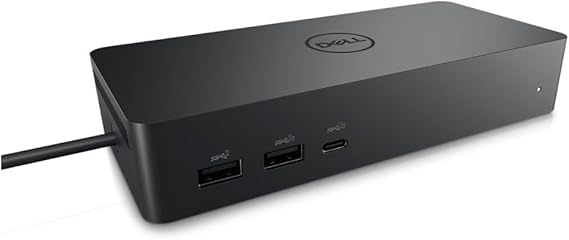
Dell DELL-UD22 UD22 Universal Dock, Black
90% of respondents would recommend this to a friend
Item #:
69355953
SAR 877
Price Details
Excluding Shipping & Custom charges ( Shipping and custom charges will be calculated on checkout )
*All items will import from US
0 ratings
Write a review
In stock
 Imported from USA store
QTY:
Order now and get it around Tuesday, September 08
Secured transaction
Ubuy works hard to protect your security and privacy. Our advanced payment security system ensures confidentiality by encrypting your information during transmission using AES (Advanced Encryption Standards) and SSL (Secure Socket Layer) protocols. Your payment details are 100% secure as we do not share your payment details with third party sellers.
Our Top Logistics Partners


Create a productive workstation with increased flexibility

Buy Now Pay Later

Fast
Shipping

Free
Return*

Secure Packaging

100% Original Products

PCI DSS Compliance

ISO 27001 Certified




Note: Step Down Voltage Transformer required for using electronics products of US store (110-120). Recommended power converters Buy Now.


What Stands Out
Versatile Connectivity
The Dell Universal Dock UD22 supports multiple device connections, offering HDMI, USB-C, and Ethernet ports, enabling seamless integration with various laptops and peripherals for enhanced productivity.
High-Resolution Support
This dock provides dual 4K display capabilities, ensuring high-resolution performance for graphic-intensive tasks, ideal for professional users seeking superior visual experiences without compromising on speed.
Compact Design
The sleek and compact form factor of the UD22 ensures efficient desk space usage, appealing to users in home offices or collaborative workspaces who value aesthetics alongside functionality.
Product Details
| Hardware Interface | HDMI, USB 3.0 Type A |
| Compatible Devices | Monitors |
| Total Usb Ports | 6 |
| Number of Ports | 10 |
| Total Number of HDMI Ports | 1 |
| Wattage | 130 |
| Item Dimensions L x W x H | 6.54"L x 1.26"W x 2.99"H (16.6 x 3.2 x 7.6 cm) |
| Item Weight | 14.7 ounces (416.75 grams) |
| Color | Black |
| Brand | Dell |
| Number of Items | 1 |
| Number of Packs | 1 |
| Unit Count | 1 Count |
| UPC | 884116431442 |
| Manufacturer | Dell Computers |
| Built-In Media | Item |
| Model Number | Dell-UD22 |
| Mfr Part Number | 210-BEXR |
| Total USB Ports | 6 |
| Product Dimensions (L x W x H) | 6.54"L x 1.26"W x 2.99"H (16.6 x 3.2 x 7.6 cm) |
| Total HDMI Ports | 1 |
Who Should Buy?

-
Remote Workers
Ideal for remote workers needing multiple connections for monitors and peripherals, enhancing productivity and workspace organization.
-
Gamers
Great for gamers who require multiple display options and peripheral connectivity for an immersive gaming experience.
-
Content Creators
Perfect for content creators who need to connect various devices and displays for multitasking during editing and production.

-
Minimalists
Not suitable for users who prefer a minimal setup, as it adds multiple connections and devices to their workspace.
Product Description
Dell DELL-UD22 UD22 Universal Dock, Black
Have any Query? Chat with us
Related Searches
Customer Questions & Answers
-
Question:
What devices are compatible with the Dell Universal Dock UD22?
Answer: The Dell Universal Dock UD22 is compatible with a wide range of devices including Dell laptops, as well as other brands supporting USB-C and Thunderbolt 3 connections. It is particularly beneficial for users with ultrabooks and 2-in-1 devices. This dock provides multiple ports, including HDMI, DisplayPort, and USB-A, which makes it a versatile accessory for both home and office setups, allowing for a seamless connection to external monitors, peripherals, and network systems. -
Question:
How do I set up the Dell Universal Dock UD22?
Answer: Setting up the Dell Universal Dock UD22 is straightforward and requires just a few simple steps. Start by connecting the dock to a power source, then connect your laptop using a USB-C or Thunderbolt 3 cable. Afterward, plug in your monitors and peripherals to the appropriate ports on the dock. The dock usually auto-configures itself, making it easy to extend your display or connect additional devices without any complicated setup. This is especially helpful for multitasking professionals who need a stable and efficient workspace. -
Question:
Can I use multiple monitors with the Dell Universal Dock UD22?
Answer: Yes, the Dell Universal Dock UD22 supports multiple monitor setups. Thanks to its array of video outputs, you can connect two external displays simultaneously via HDMI and DisplayPort. This is ideal for users who require enhanced productivity and wish to work on multiple applications side by side. For instance, graphic designers or data analysts can benefit significantly from expanded screen real estate, allowing for easier access to tools and documents. -
Question:
Does the Dell Universal Dock UD22 provide power delivery to laptops?
Answer: Absolutely, the Dell Universal Dock UD22 offers power delivery capabilities, enabling it to charge your connected laptop while in use. This feature eliminates the need for multiple chargers and helps keep your workspace tidy. Users with high-performance laptops will find this particularly advantageous as it allows for uninterrupted usage, especially during intensive tasks like video editing or gaming. You can stay productive without worrying about battery life. -
Question:
Is the Dell Universal Dock UD22 suitable for gaming?
Answer: While the Dell Universal Dock UD22 is primarily designed for office and productivity use, it can also be used for gaming, particularly with laptops that support gaming graphics. Users can connect their devices to a monitor for improved graphics display and performance. However, keep in mind that performance might vary based on your laptop's hardware capabilities; it works best when paired with devices that have robust processing power and high-refresh-rate monitors. -
Question:
What type of cables are included with the Dell Universal Dock UD22?
Answer: The Dell Universal Dock UD22 generally comes with a power adapter and a USB-C cable. These components are essential for connecting the dock to your laptop and powering it properly. Depending on the package, you may also need to use additional cables for connecting your monitors or peripherals. Users often find that having extra HDMI or DisplayPort cables on hand can enhance their connectivity options, ensuring they can set up their workspace as they prefer. -
Question:
How does the Dell Universal Dock UD22 enhance my productivity?
Answer: The Dell Universal Dock UD22 significantly enhances productivity by allowing multiple connections simultaneously, transforming your laptop into a comprehensive workstation. With its various ports for displays, USB devices, and networking, you can work with multiple screens and tools. For instance, professionals who deal with large spreadsheets or design software can efficiently manage their work environment, thereby streamlining workflows and minimizing time wasted on switching between applications. -
Question:
Can I use the Dell Universal Dock UD22 with an older laptop model?
Answer: Yes, the Dell Universal Dock UD22 can be used with older laptops, provided they have compatible ports, such as USB-C or Thunderbolt 3 connections. If your older laptop does not support these ports, alternative methods like USB-A adapters can sometimes facilitate connection, though functionality may be limited compared to newer models. This adaptability makes the dock a versatile choice for users transitioning from older to newer laptops or those with mixed tech environments. -
Question:
What are the dimensions of the Dell Universal Dock UD22?
Answer: The Dell Universal Dock UD22 typically has compact dimensions that make it easy to fit into any workspace without clutter. It is designed to occupy minimal desk space while providing extensive connectivity options. This is particularly important for users who may have limited desk space or need to frequently rearrange their work environment. With its sleek design, it complements both home offices and formal office settings seamlessly. -
Question:
Where can I buy Dell Universal Dock UD22 Black in Saudi Arabia?
Answer: You can purchase the Dell Universal Dock UD22 Black from Ubuy, a reliable online retailer that offers a wide selection of electronic products. Ubuy frequently provides detailed product descriptions and user reviews, making it easier for you to make an informed purchasing decision. Plus, with various shipping options, Ubuy ensures that you can conveniently obtain your ideal tech accessories from the comfort of your home.
Dell Docking Stations Dell-UD22 Editorial Review
Dell DELL-UD22 UD22 Universal Dock, Black is an essential accessory for modern laptops with limited ports, providing an array of connectivity options including HDMI, USB-C, and RJ-45 gigabit ports. Users have praised its ability to connect multiple computers seamlessly to monitors, showcasing its versatility for both Windows PCs and MacBook systems. The dock's impressive power delivery capability, offering up to 96W via USB-C, further enhances its utility in professional and home environments. Although some users mentioned intermittent connectivity issues with peripherals like mice and speakers, the overall consensus is that this dock offers a practical solution to expand connectivity and efficiency.
Customer Reviews & Ratings
1 customers ratings
-
5 Star
100%
-
4 Star
0%
-
3 Star
0%
-
2 Star
0%
-
1 Star
0%
Review this product
Share your thoughts with other customers
Pros
- Multiple connectivity options including HDMI and USB-C ports
- Seamless connection for dual computer setups
- Provides adequate power delivery for laptops
- Compact design fits easily into any workspace
- Durable build quality ensures longevity
Platform Trust & Buyer Confidence

MA
Mekki
Verified buyer
“Arrive before time, excellent products”
9 July 2026 · via Trustpilot
FS
Farrah
Verified buyer
“A very big Thank you to HUDA and the Ubuy Team in helping to send my order to me yesterday!! Order # 62606425316 Customer service and operations is top for this online shopping company and I am very satisfied with the way they handle issues. THANK YOU once again!!”
25 June 2026 · via Trustpilot
AF
Anila
Verified buyer
“Good experience of shopping through Ubuy.”
16 June 2026 · via Trustpilot
MG
Mohamed
Verified buyer
“We feel very good about the delivery time, and the materials we received matched our order.”
14-Jul-26 · via Trustpilot
E
Essam
Verified buyer
“Perfect service and fast delivery.”
16-Jul-26 · via Trustpilot
Secure Checkout
Global Delivery
Easy Returns
Genuine Products
Related Categories
Related Brands
Top selling Dell Dock UD22 in Saudi Arabia




Last Updated on August 30, 2026
Product Price History
Important information
- Limitations : For products shipped internationally, please note that any manufacturer warranty may not be valid; manufacturer service options may not be available; product manuals, instructions, and safety warnings may not be in destination country languages; the products (and accompanying materials) may not be designed in accordance with destination country standards, specifications, and labeling requirements; and the products may not conform to destination country voltage and other electrical standards (requiring use of an adapter or converter if appropriate). The recipient is responsible for assuring that the product can be lawfully imported to the destination country. When ordering from Ubuy or its affiliates, the recipient is the importer of record and must comply with all laws and regulations of the destination country.
- Not all the products listed on Ubuy are for sale, as Ubuy is a global search engine. Products are subject to export/trade regulations.
SAR 877
Order now and get it around Tuesday, September 08
This item is not restrict in my country.(Please click on above link if this item is not restrict in your country, So our team will review and allow.)
QTY:
Secured transaction
PCI DSS compliant and ISO 27001:2022 certified, with encrypted payments and full buyer protection on every order.
Our Top Logistics Partners
Fastest cross-border delivery
Features & Benefits
- Dell Universal Dock UD22 supports consistent display across systems
- It has the highest number of ports on a universal dock
Ubuy Assurance
Experience worry-free shopping with 100% original products, PCI DSS-compliant payment security, ISO 27001-certified data protection, the fastest cross-border delivery, free returns *, and secure packaging on every order.