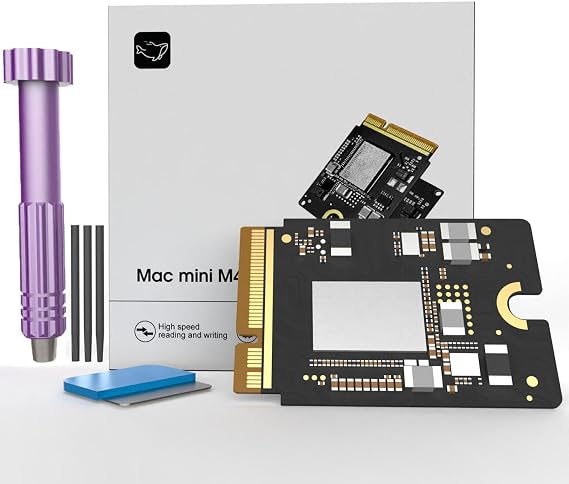


منتج #:
244510634
Mac mini M4 SSD 1TB, Hard Disk Storage Upgrade for Mac mini M4 | Upgrade your storage to securely store all your files with confidence.
منتج #:
244510634
SAR 1234
تفاصيل السعر
باستثناء رسوم الشحن والجمارك ( سيتم احتساب رسوم الشحن والجمارك عند إتمام الشراء )
*سيتم استيراد جميع العناصر من أمريكا
0 ratings
اكتب رأيك
متوفر فى المخزون
 مستورد من متجر USA
اطلب الآن واحصل عليه حول الأربعاء, اغسطس 26
معاملة آمنة
تعمل يوباي جاهدة لحماية أمنك وخصوصيتك. يضمن نظام أمان الدفع المتقدم لدينا السرية من خلال تشفير معلوماتك أثناء النقل باستخدام بروتوكولات AES (معايير التشفير المتقدمة) وSSL (طبقة المنافذ الآمنة). تفاصيل الدفع الخاصة بك آمنة بنسبة %100 لأننا لا نشارك تفاصيل الدفع الخاصة بك مع بائعين تابعين لجهات خارجية
أفضل شركائنا اللوجستيين


Expand your Mac mini M4 storage with our 1TB SSD, boasting read/write speeds of up to 3300 MB/s for lightning-fast performance!

اشتر الآن وادفع لاحقاً

شحن
سريع

استرجاع
مجاني*

تغليف آمن

منتجات أصلية %100

الامتثال لمعيار PCI DSS

حاصل على شهادة ISO 27001




Note: Step Down Voltage Transformer required for using electronics products of أمريكا store (110-120). Recommended power converters اشتري الآن.


تفاصيل المنتج
| Digital Storage Capacity | 1 TB |
| Hard Disk Interface | eSATA |
| Connectivity Technology | Thunderbolt |
| Additional Features | Data Recovery Service |
| Hard Disk Form Factor | 2.5 inches (6.4 cm) |
| Compatible Devices | Macmini M4 |
| Specific Uses For Product | Personal |
| Read Speed | 3300 megabytes_per_second |
| Media Speed | 3300 megabytes_per_second |
| Data Transfer Rate | 3300 megabits_per_second |
| Form Factor | 2.5-inch (6.4 cm) |
| Hardware Connectivity | Thunderbolt |
| Installation Type | Internal Hard Drive |
| Enclosure Material | Nand Flash |
| Brand | Zinweyton |
| Model Number | AD-AU |
| Hard Disk Description | Solid State Drive |
| Built-In Media | 1 |
| Model Name | AD-AU |
| Manufacturer | Zinweyton |
| Hard-Drive Size | 1 TB |
| Number of Items | 1 |
| Unit Count | 1 Count |
| Customer Package Type | Standard Packaging |
| Special Feature | Data Recovery Service |
| Hard Disk Size | 1 TB |
| Item Weight | 0.5 lbs (230 grams) |
وصف المنتج
Mac mini M4 SSD 1TB, Hard Disk Storage Upgrade for Mac mini M4 | Upgrade your storage to securely store all your files with confidence.
هل لديك أي استفسار؟ تحدث معنا
أسئلة العملاء & الإجابات
-
سؤال:
What are the benefits of upgrading to a 1TB SSD for my Mac mini?
إجابه: Upgrading to a 1TB SSD significantly enhances your Mac mini's performance. The increased storage capacity allows you to store more applications, files, and media without worrying about running out of space. Additionally, SSDs provide faster read and write speeds compared to traditional hard drives, resulting in quicker boot times, application launches, and file transfers. This upgrade is particularly beneficial for users working with large files or demanding applications, such as video editing software or graphic design programs. -
سؤال:
Is the M4 Macmini 1TB SSD compatible with my Mac mini model?
إجابه: The M4 Macmini 1TB SSD is designed for specific Mac mini models. Before making a purchase, it’s crucial to verify compatibility with your Mac mini version. You can typically find compatibility information in the product specifications or by checking Apple’s official documentation. Ensuring that the SSD matches your system's model will guarantee optimal performance and reliability post-installation, allowing you to take full advantage of the storage upgrade. -
سؤال:
Can I install the 1TB SSD myself, or will I need professional help?
إجابه: Yes, the M4 Macmini 1TB SSD is designed for DIY installation, making it accessible for users with basic technical skills. The process typically involves opening the Mac mini case, replacing the current hard drive with the SSD, and securely reassembling the unit. Installation guides and video tutorials are often available online to assist you through each step. However, if you're uncomfortable performing the upgrade yourself, seeking help from a professional technician is always an option. -
سؤال:
What tools do I need to install the M4 Macmini 1TB SSD?
إجابه: To install the M4 Macmini 1TB SSD, you'll need a few basic tools. Typically, a Torx screwdriver set and a spudger tool are essential for opening the Mac mini and safely removing the existing hard drive. Additionally, you may require an ESD strap to prevent static damage to internal components. Preparing these tools before starting the installation process will help ensure a smooth and safe upgrade experience, allowing you to focus on the task at hand. -
سؤال:
Will upgrading to a 1TB SSD improve gaming performance on my Mac mini?
إجابه: Absolutely, upgrading to a 1TB SSD can enhance gaming performance on your Mac mini. SSDs provide faster data access, which translates to quicker load times for games and smoother gameplay. This enhancement is particularly evident in titles requiring substantial assets or textures. Players should notice an overall improvement in the gaming experience, enabling more fluid transitions and less lag during gameplay. -
سؤال:
What precautions should I take before installing the M4 Macmini SSD?
إجابه: Before installing the M4 Macmini SSD, it’s essential to back up all important data to avoid data loss. Additionally, you should ensure your workspace is well-lit and free from static electricity to protect your Mac mini’s internal components. Take your time to understand the installation process through manuals or guides, and prepare all necessary tools beforehand. Following these precautions will promote a successful upgrade and help maintain the integrity of your device. -
سؤال:
Can I use the M4 Macmini 1TB SSD for booting macOS?
إجابه: Yes, the M4 Macmini 1TB SSD is suitable for booting macOS. In fact, installing macOS on an SSD can lead to notable improvements in system responsiveness and performance. After installation, you can easily configure the new SSD as your startup disk through system preferences. This setup allows for faster boot times, allowing you to start working more quickly and efficiently. -
سؤال:
What is the expected lifespan of an SSD compared to a traditional hard drive?
إجابه: SSDs, including the M4 Macmini 1TB SSD, generally offer a longer lifespan than traditional hard drives. With no moving parts, SSDs are less prone to mechanical failure, making them more durable. While the actual lifespan varies based on usage, typically, SSDs can last many years while providing consistent speed and performance. This longevity makes them an excellent investment for users seeking reliable storage solutions. -
سؤال:
What format should I use to initialize my new SSD after installation?
إجابه: After installing the M4 Macmini 1TB SSD, it is recommended to initialize it in the APFS format. This file system is optimized for SSDs and provides improved efficiency for macOS. To format the drive, you can use the Disk Utility application available in macOS. Choosing the right format ensures your SSD operates smoothly and takes full advantage of its performance capabilities, helping you achieve optimal results. -
سؤال:
Where can I buy the 2025 M4 Macmini 1TB SSD Storage Upgrade Internal Hard Disk for Mac mini in Saudi Arabia?
إجابه: You can purchase the 2025 M4 Macmini 1TB SSD Storage Upgrade Internal Hard Disk for Mac mini at Ubuy. They offer a wide range of products, including this SSD upgrade, ensuring convenience in your shopping experience. Ubuy is known for its reliable service and can help you find the right components for your Mac mini.
Zinweyton Internal Components AD-AU مراجعة تحريرية
لم يتم العثور على مراجعات تحريرية
مراجعات العملاء وتقييماتهم
1 تقييمات العملاء
-
5 نجمة
100%
-
4 نجمة
0%
-
3 نجمة
0%
-
2 نجمة
0%
-
1 نجمة
0%
أضف تقييم لهذا المنتج
شارك أفكارك مع عملاء آخرين
منصة موثوقة وثقة كاملة للمشتري

MA
Mekki
مشتري موثّق
“Arrive before time, excellent products”
9 July 2026 · عبر Trustpilot
FS
Farrah
مشتري موثّق
“A very big Thank you to HUDA and the Ubuy Team in helping to send my order to me yesterday!! Order # 62606425316 Customer service and operations is top for this online shopping company and I am very satisfied with the way they handle issues. THANK YOU once again!!”
25 June 2026 · عبر Trustpilot
AF
Anila
مشتري موثّق
“Good experience of shopping through Ubuy.”
16 June 2026 · عبر Trustpilot
MG
Mohamed
مشتري موثّق
“We feel very good about the delivery time, and the materials we received matched our order.”
14-Jul-26 · عبر Trustpilot
E
Essam
مشتري موثّق
“Perfect service and fast delivery.”
16-Jul-26 · عبر Trustpilot
الخروج الآمن
شحن عالمي
إسترجاع سهل
منتجات أصلية
تاريخ سعر المنتج
معلومات مهمة
- القيود: بالنسبة للمنتجات التي يتم شحنها دولياً، يُرجى ملاحظة أن أي ضمان من الشركة المصنعة قد لا يكون صالحاً؛ قد لا تتوفر خيارات خدمة الشركة المصنعة؛ قد لا تكون أدلة المنتج والتعليمات وتحذيرات السلامة مكتوبة بلغة بلد المقصد؛ قد لا يتم تصميم المنتجات (والمواد المصاحبة لها) وفقاً لمعايير بلد الوجهة والمواصفات ومتطلبات الملصقات؛ وقد لا تتوافق المنتجات مع الجهد الكهربي المستخدم في بلد الوجهة والمعايير الكهربائية الأخرى (تتطلب استخدام محوّل كهربي أو جهاز تحويل إذا كان ذلك مناسباً). المستلم مسؤول عن ضمان إمكانية استيراد المنتج بشكل قانوني إلى بلد الوجهة. عند الطلب من يوباي أو الشركات التابعة لها، يكون المستلم هو المستورد المسجل ويجب أن يلتزم بجميع القوانين واللوائح الخاصة ببلد الوجهة.
- ليست كل المنتجات المدرجة على يوباي معروضة للبيع، لأن يوباي هو محرك بحث عالمي. المنتجات تخضع للوائح التصدير / التجارة.
SAR 1234
اطلب الآن واحصل عليه حول الأربعاء, اغسطس 26
هذا المنتج غير ممنوع في بلدي. (الرجاء الضغط على الرابط أعلاه إذا لم يكن هذا المنتج ممنوعاً في بلدك ، لذلك سيقوم فريقنا بمراجعته والسماح به.)
كمية:
معاملة آمنة
نوفر لك مدفوعات مشفّرة، وحماية متكاملة للمشتري، مع الالتزام بمعايير PCI DSS وشهادة ISO 27001:2022 لضمان أعلى مستويات الأمان في كل عملية شراء.
أفضل شركائنا اللوجستيين
أسرع توصيل عبر الحدود
المميزات والفوائد
- توافق مثالي مع Mac mini M4 لسهولة التثبيت.
- تم اختباره بالكامل للتأكد من موثوقيته وأدائه المتسق دون انخفاض السرعة.
- يوفر سعة 1 تيرابايت لتخزين المزيد من الصور ومقاطع الفيديو والمستندات والتطبيقات.
- أداء عالي السرعة مع سرعات قراءة/كتابة تصل إلى 3300 ميجابايت/ثانية.
- يحسن وقت بدء تشغيل الكمبيوتر وسرعات تشغيل التطبيقات.
- قم بتعزيز تجربتك الرقمية باستخدام إمكانيات نقل الملفات الفعالة.
ضمان Ubuy
تسوّق بثقة مع منتجات أصلية %100، ومدفوعات آمنة متوافقة مع معيار PCI DSS، وحماية بيانات معتمدة وفق ISO 27001، وشحن دولي سريع، وإرجاع مجاني*، وتغليف آمن لكل طلب.